Banners
Big and Exit Banners
No need to make a Sitecore component here. Just copy the template below and update the href and src attributes with the final URL for your ticket and the scmedia URLs for the respective banners.
<a href="FINAL_URL" target="_blank">
<img src="SCMEDIA_URL" border="0" /></a>
- Big Banner:
Big Banner-545x60.jpg - Exit Banner:
Exit Banner -336x280.jpg - Exit Banner w/ CTA:
Exit Banner w CTA -336x280.jpg
To find the scmedia URLs for the above images:
- Go to the Sitecore directory where you uploaded your ticket's creatives.
- Select the image you need, then in the Media section, click Open.
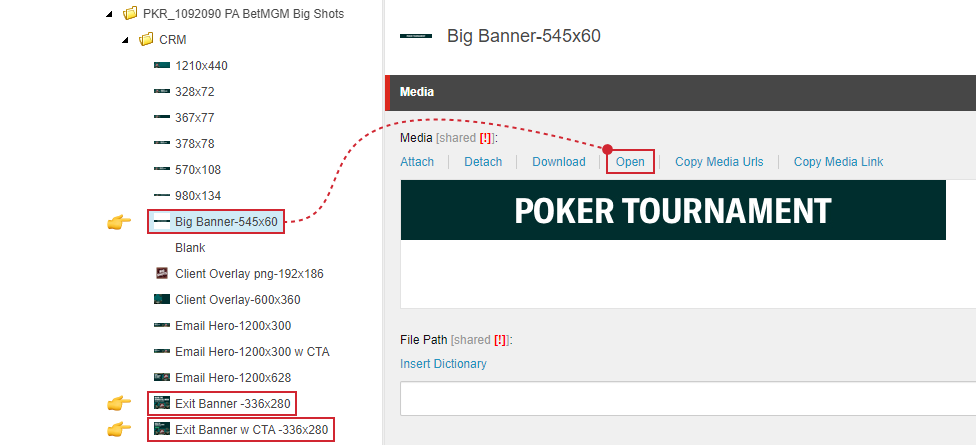
- A new tab will open. Copy the URL in the address bar, then paste it in the
srcattribute in the template.
- Repeat for the other banner images.
Sample Output
Big Banner:
<a href="https://poker.pa.betmgm.com/en/tournaments/betmgm-poker-big-shots" target="_blank">
<img src="https://scmedia-us.itsfogo.com/$-$/2a8439b3883c4b6e92fd15dac7a6a8f2.jpg" border="0" /></a>
Exit Banner:
<a href="https://poker.pa.betmgm.com/en/tournaments/betmgm-poker-big-shots" target="_blank">
<img src="https://scmedia-us.itsfogo.com/$-$/611f1c6fd4bd4f669c5565babb34477d.jpg" border="0" /></a>
Exit Banner with CTA:
<a href="https://poker.pa.betmgm.com/en/tournaments/betmgm-poker-big-shots" target="_blank">
<img src="https://scmedia-us.itsfogo.com/$-$/4ef7fa4971e544a0b90141c8cfc1d445.jpg" border="0" /></a>