
Cabinet Module Training Video
· One min read
Cabinet Module Training Video
There is a new update regarding the Video Banners. Attached here is the guide for the update
Thank you!
Hi team,
I wanted to share an update regarding Terms and Condition across our Canada products (BetMGM Ontario + Wheel of Fortune Ontario).
Moving forward, Terms and Conditions need to be visible Open by default on all MPPs, MPPV2s and ACQ LPs (no click to open up Terms and Conditions required). When building, make sure you’re applying the correct CSS inside the HTML section where we input the Terms and Conditions.
Canada_Terms_Conditions_CSS_Guide.docx.
I put together a quick reference doc with the exact snippets for each.
Nothing too complicated, just something to keep in mind as part of the standard build process going forward.
Let me know if you run into anything.
--
Follow up from Vivian
Hello everyone,
Thanks to Ruben, I was able to create a shortcut of his code by building a Dictionary Item for each common, before Log In, Terms and Conditions expansion, so please copy-and-paste the following before inputting the actual Terms and Conditions via its container, Edit HTML:
${dic:7BC317EA-A048-486F-9984-45559DFF2CAF/ExpandMPPV1TermsandConditions}${dic:1743B9D3-9254-4DAF-BEAF-35C286C69D82/ExpandMPPV2TermsandConditions}${dic\:CD4E73BD-EED3-40EA-97C4-B63283422FA1/ExpandACQLPTermsandConditions}This is similar to the idea of always starting with the Poker Terms and Conditions Dictionary Item in both the Poker Tournament and Promotion Pages, Terms container, Edit HTML before inputting the actual Terms and Conditions, except these Dictionary Items above actually expand the Terms and Conditions whereas the Poker Terms and Conditions Dictionary Item just simply displays the text, Terms and Conditions. We prefer the usage of these Dictionary Items above, because:
We look forward to seeing these Dictionary Items in all future Ontario province label site Builds from here on out and are still discovering ways to simplify and meet this Ontarian regulatory requirement, which we will update you on whenever we can.
Please do not hesitate and feel free to let Ruben know if you have any question about his code and me if you have any question about Dictionary Items.
Thank you for your attention, understanding, assistance, and time!
Hi all,
Sharing an update from the Ops team as it relates to building + pushing rest IDs to optimove.
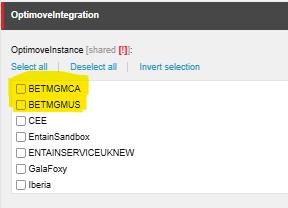
Under ‘OptimoveIntegration’ and OptimoveInstance - where we’d normally tick ‘RoarDigital’, going forward we will be using the two highlighted sections below; BETMGMCA for anything in Canada (BetMGM Ontario, WOF Ontario and Alberta labels as they launch) and BETMGMUS for everything else – Borgata, WOF, PartyCasino, etc. in the US. Please tick the applicable box before pushing to optimove.
Please use this setup going forward. Any previously created rest IDs with RoarDigital ticked can stay as is, no need to make updates.

Please reach out if you have any questions. Thank you!
Hi everyone,
Just a couple of quick reminders to help streamline our promo build process and improve visibility across teams:
When creating a shared promotion—even if only one restaurant ID (rest ID) is involved—please make sure that rest ID is included in all applicable builds and comments within Workflow (WF).
Why this matters: OPS need to quickly locate specific rest IDs when reviewing tickets. If the ID is only listed in one place, it can slow things down and create unnecessary back-and-forth.
For any Thunderbite promotions, please ensure that static tiles are always created.
Why this matters: Since Thunderbite promos do not go through PAT, a static tile is always required for proper execution and visibility.
The US Team have provided us a Panel pAPI Spiral Wheel Tutorial as we may get more of these tickets from now on. See video above for the training video.
A documentation page will be added soon.
HERE ARE THE LINKS FOR THE CMS QA CHANGES:
You can use the Checklist HERE to help you with your builds.
Hello Team,
Good day.
Hope you all have a great holiday. We are now in the exciting part of the QA journey. We will be implementing this starting this May 2025.
As we discussed before that we will be keep improving and updating the QA for our Team. During the last all hands meeting I showed everyone the new QA sheet and how we upgrade our processes and also now we will distribute the soft copy of our QA Checklist. Please kindly review it, attached here. Like I mention we will print those checklist when our printer will be available again in our work area.
Additional information with the duration of builds, also attached pdf file.
Please let me know if you have questions, feel free to reach out.
Again, review all attached files and let's all set our goal for the QA Monthly Awards. #5kMonthly
Kindly acknowledge this email when received. Thank you.\
This was sent on May 1, 2025.
Hello Everyone,
Good day.
Here is the summary of our meeting earlier:
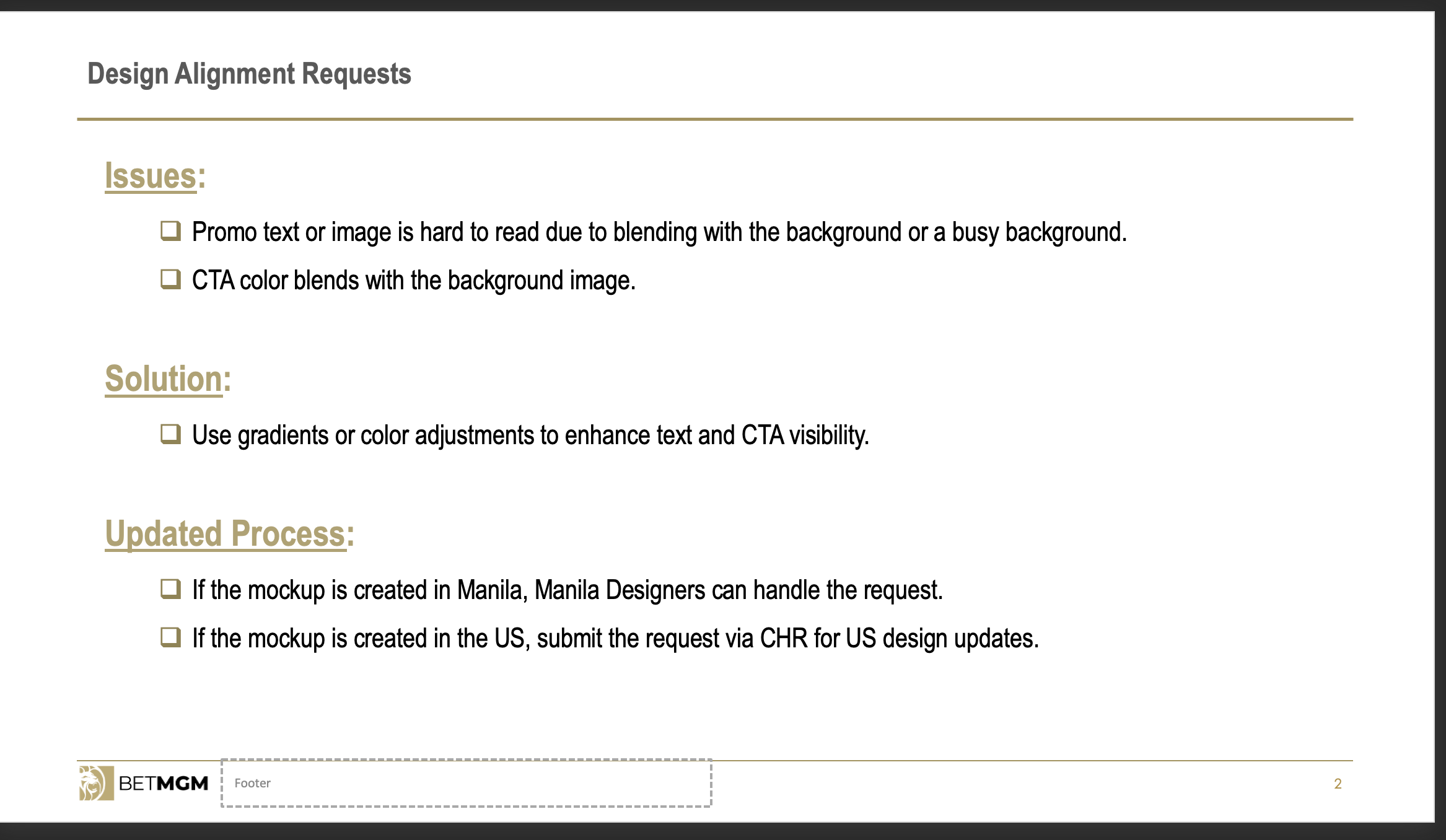
Make sure to check who created the MOCK Designs, if Manila made the ticket mock, we can ask in GC teams for edits, for US team we need to request for CHRs.
Inform subleads and tagged Mike David for image adjustments for Design team.
Let me know if you have any questions.
Thank you.
To avoid any confusion on when and how to use the OLG line, please refer to the guide below. We’ve also attached a more detailed version with screenshots for easier reference.
Important: These guidelines apply only if the OLG line is present in the copy. If there’s no OLG line, you may proceed without adding anything.
If the OLG line is present:
FOR CASINO
Shared promotion – NJ only
Shared promotion – all states (NJ, WV, MI, PA)
** **
FOR SPORTS
If you have any questions or need clarification, please let us know.

BetMGM
Hello everyone,
On November 10th, BetMGM Casino iOS Mobile App > West Virginia is the first to transition to Wrapper
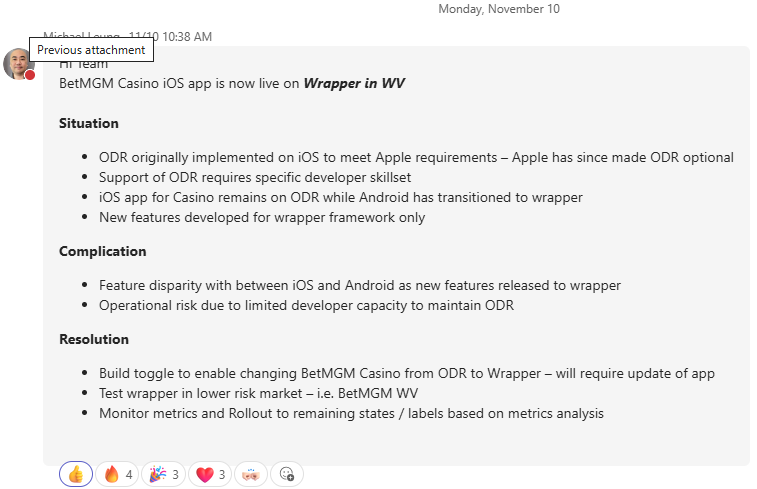
So what can we expect of this and future Wrapper transitions? First, I would like to best describe the Wrapper transition in my own words as I come to better understand it as "a mirror of Mobile Web on Mobile App."
Since by standard, Mobile Web is usually accommodated and built for, anything specific to iOS Mobile App and ODR now no longer need to be accommodated and built for on BetMGM WV, including the following:
Therefore, if you are able to access the BetMGM Casino iOS Mobile App and state-switch to West Virigina, then what you are observing is "a mirror of BetMGM WV Mobile Web", because based on the back-end of BetMGM Casino iOS Mobile App > West Virginia:
Please note that the above is not an exhaustive list, but a list of features that I were able to notice and point-out during the time of drafting this email.
In conclusion and addition to what Michael announced, we save time by no longer doing double the work by accommodating and building anything specific to iOS Mobile App and ODR, but only on BetMGM WV for now, so looking forward to future Wrapper transitions!
This is all I have to share at the moment that I have discovered regarding this topic, but if I have any additional update to share, then I will follow-up via email by Replying All.
If you have any question and/or concern at all, please do not hesitate and feel free to let me know. Sorry that I did not draft and send this email sooner, but thank you for your attention, understanding, assistance, and time!
Kind regards,
Vivian