Core Domain
Overview
Core domains are pages where players can place bets on a certain sport or league. For example, here is the core domain for the NFL:
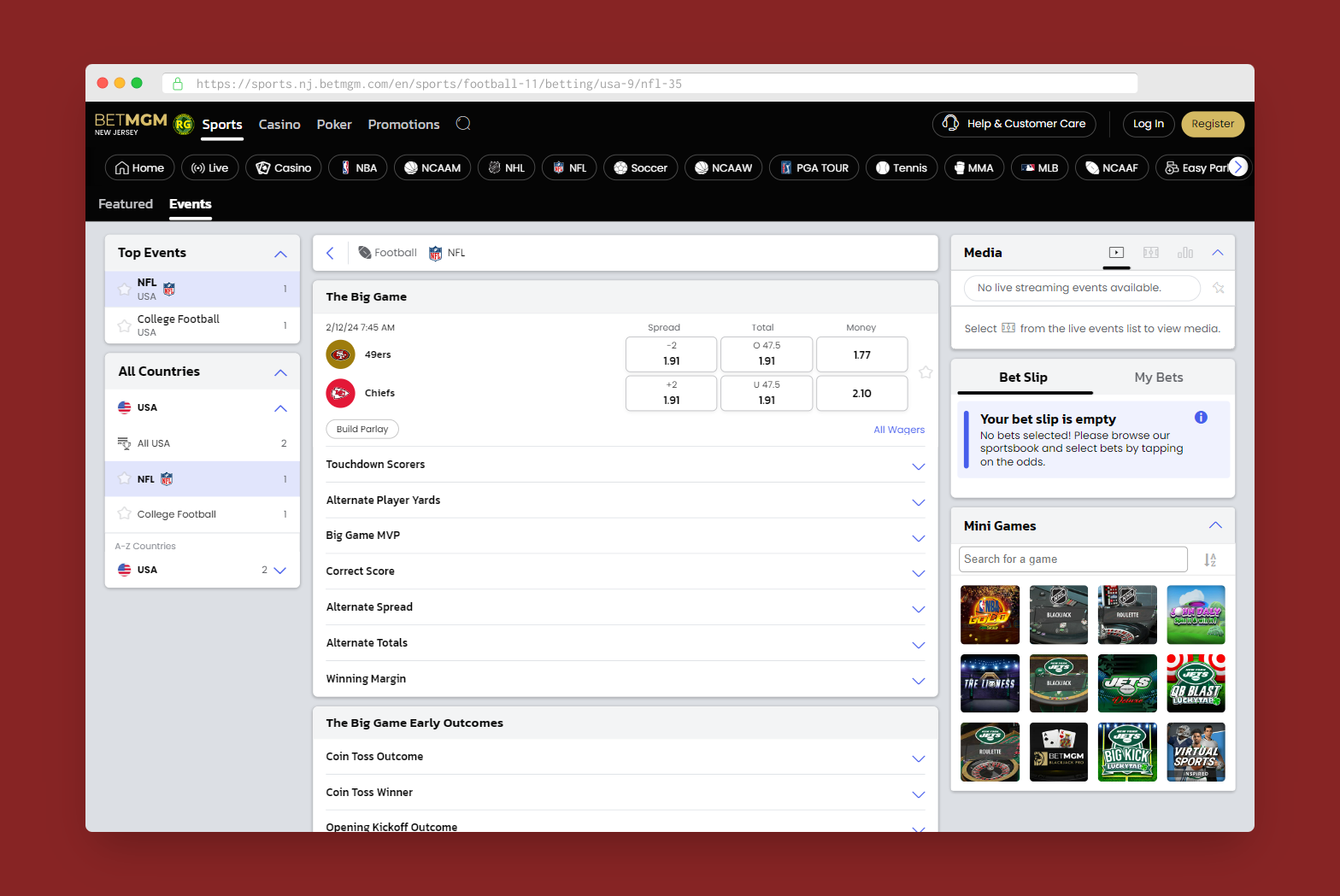
You can find links to the other core pages at the top navigation bar or (if you're on Sports home) in the A-Z menu on the left sidebar.
When you scroll down the core page, you'll find a disclosure component just before the footer that contains the page copy for that core domain.
Updating the Core Domain
Your task is to update the core domain copy for all Sports states (or just the ones specified in your ticket).
You will receive a Google Doc which contains the URL for the core domain and the updated copy you need to use.
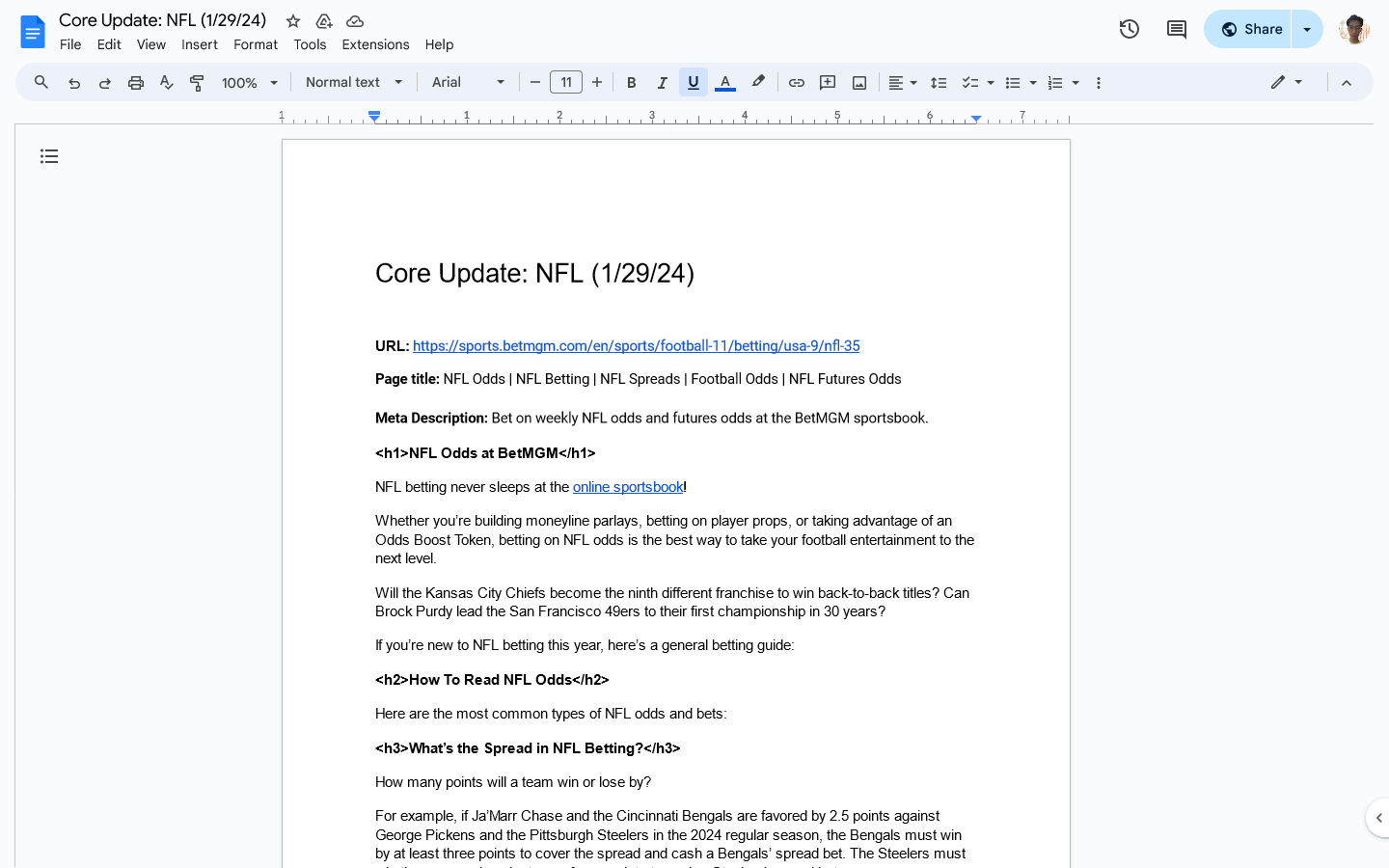
If you take a look at the URL, you'll notice certain numbers that come after a sport/country/league. These segments actually map to a Sitecore component as shown in the image below.
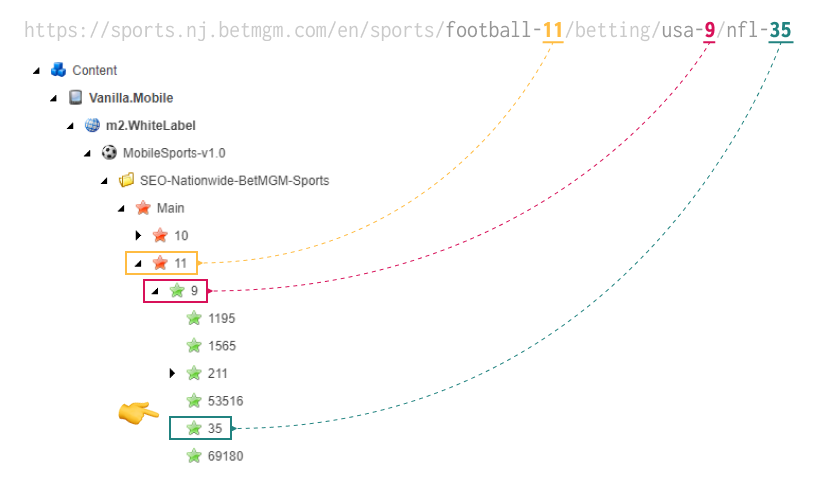
Let's say we're working on the NFL core domain, which has the following URL:
https://sports.STATE.betmgm.com/en/sports/football-11/betting/usa-9/nfl-35
Take note of the three segments with numbers after the /sports/ subdirectory:
/football-11- maps to the component
/usa-9- maps to the component
/nfl-35- maps to the component
The component that maps to the last segment in the URL is the one you need to update. In this case, you need to update the
component in all three Sitecore paths.
Sitecore components
There are three components you need to update:
- Whitelabel - the "master template" where all labels can clone from.
- Nationwide - a clone copy of the above in the national domain (
m2.betmgm.com). You may not need to update this once you've updated the Whitelabel component, but you still need to include the Sitecore DL in your WF comment. - National - this is where US labels clone from.
Since BetMGM ON is not included in the US CMS (cms-us.prod.env.works), you also need to update the Whitelabel component in cms.prod.env.works.
- Paths
- US Direct Links
- ON Direct Links
- Whitelabel: Content > Vanilla.Mobile > m2.WhiteLabel > MobileSports-v1.0 > SEO-Nationwide-BetMGM-Sports
- Nationwide: Content > Vanilla.Mobile > m2.betmgm.com > MobileSports-v1.0 > SEO-Nationwide-BetMGM-Sports
- National: Content > Vanilla.Mobile > m2.betmgm.com > MobileSports-v1.0 > SEO
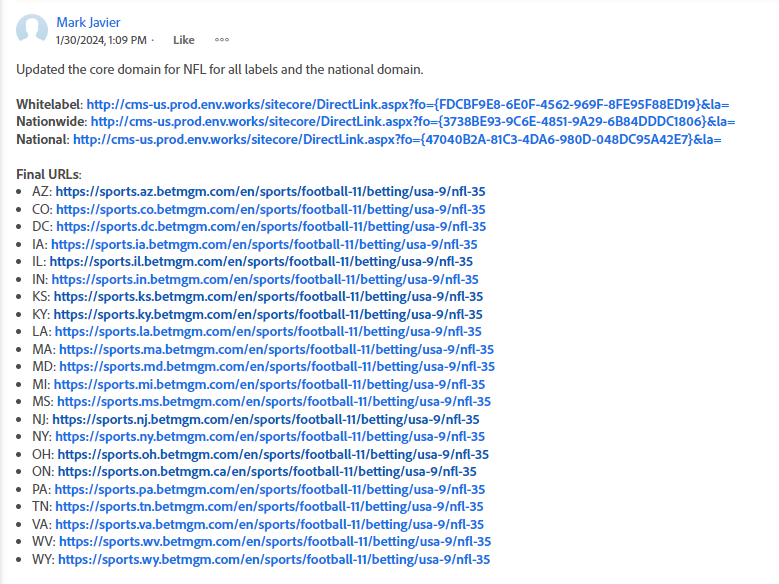
- Whitelabel: http://cms-us.prod.env.works/sitecore/DirectLink.aspx?fo={F7983F4A-D010-496D-B7B3-099935FFDD2A}&la=
- Nationwide: http://cms-us.prod.env.works/sitecore/DirectLink.aspx?fo={E08E641D-AEB8-452B-A35F-688E36025735}&la=
- National: http://cms-us.prod.env.works/sitecore/DirectLink.aspx?fo={9BCD5D77-FEE9-4E49-882A-57EF9F0811B1}&la=
- Whitelabel: http://cms.prod.env.works/sitecore/DirectLink.aspx?fo={F7983F4A-D010-496D-B7B3-099935FFDD2A}&la=
- Nationwide: N/A
- National: N/A
Copy the direct links to the components you update. You'll include this in your WF comment.
Updating the copy
Before making any updates, keep the old core page open in a tab so you can use it as a quick reference later when checking the links for different states.
Place the updated copy into the corresponding Sitecore fields. Make sure the StayOnline checkbox is checked.
Copy document | Sitecore field |
Page title | MetaTitle |
Meta Description | MetaDescription |
| H2Header |
Body text | Text |
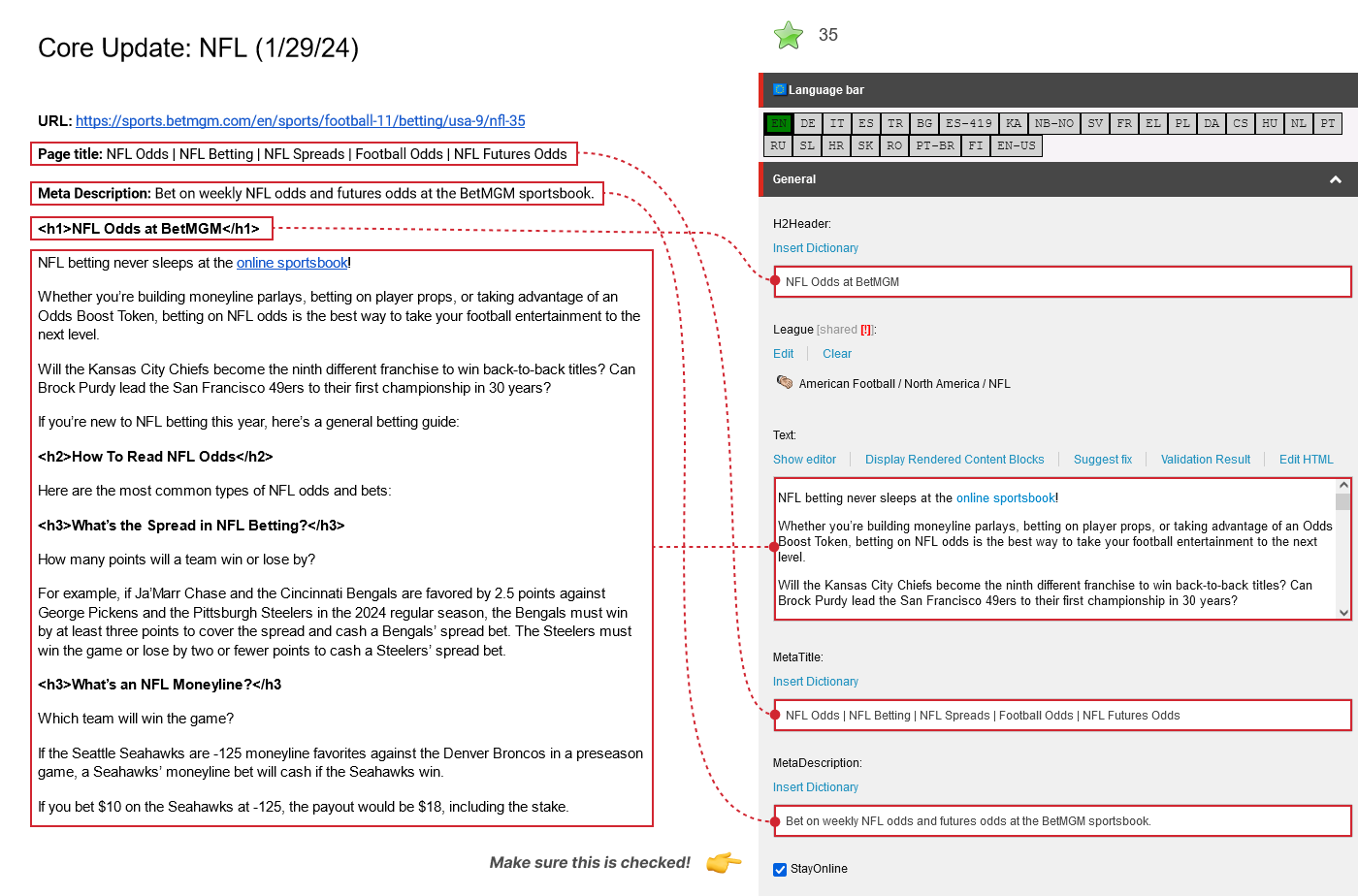
Things to update in the body text
-
Convert all other headings into
<h4>tags, and wrap the inner text inside<strong>tags. For example:Examples:
- <h2>How To Read NFL Odds<h2> →
<h4><strong>How To Read NFL Odds</strong></h4> - <h3>What's the Spread in NFL Betting?</h3> →
<h4><strong>What's the Spread in NFL Betting?</strong></h4>
- <h2>How To Read NFL Odds<h2> →
-
Check the links one by one. If a link redirects to the BetMGM geolocator, you need to convert it into a smartlink by replacing
https://sports.betmgm.com/enin the URL with!!M2.Sports. If it loads properly, keep it as is.Examples:
Link | Redirects to Geolocator? | Final |
Yes |
| |
No | https://sports.betmgm.com/en/blog/nfl/nfl-mvp-odds-tickets-handle-bm03/ | |
Yes |
|
"Why is the core page for X state not updating?"
Some states are not set up properly to clone from WhiteLabel. When that happens, you'll have to manually update the Sitecore component for these states. (Hint: it's usually IL)
To do this:
-
Go to Content > Vanilla.Mobile > m2.
state.betmgm.com > MobileSports-v1.0 > SEO > Main, then look for the corresponding component for the core domain you're updating. -
If you don't see a yellow box that says "This item is cloned! It cannot be modified!" then it means the component isn't cloned from WhiteLabel. So you have to update it manually.
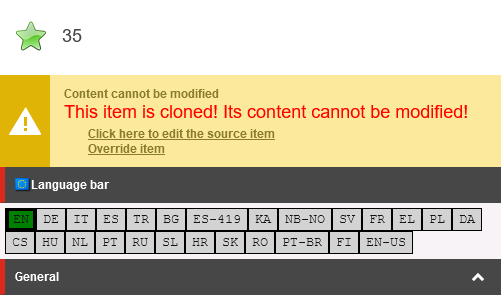
-
Update the Sitecore fields like you did with the Whitelabel component.
-
Save and finalize, wait for a few minutes, then check the final URL for that state to see if the changes have already reflected.
Compile final URLs for Sports states
Once you're done updating the Sitecore components, you need to list all of the final URLs for the states you've updated. This will be included in your WF comment.
Here's a list of all Sports states:
- AZ: https://sports.az.betmgm.com/en/sports
- CO: https://sports.co.betmgm.com/en/sports
- DC: https://sports.dc.betmgm.com/en/sports
- IA: https://sports.ia.betmgm.com/en/sports
- IL: https://sports.il.betmgm.com/en/sports
- IN: https://sports.in.betmgm.com/en/sports
- KS: https://sports.ks.betmgm.com/en/sports
- KY: https://sports.ky.betmgm.com/en/sports
- LA: https://sports.la.betmgm.com/en/sports
- MA: https://sports.ma.betmgm.com/en/sports
- MD: https://sports.md.betmgm.com/en/sports
- MI: https://sports.mi.betmgm.com/en/sports
- MS: https://sports.ms.betmgm.com/en/sports
- NJ: https://sports.nj.betmgm.com/en/sports
- NY: https://sports.ny.betmgm.com/en/sports
- OH: https://sports.oh.betmgm.com/en/sports
- ON: https://sports.on.betmgm.ca/en/sports
- PA: https://sports.pa.betmgm.com/en/sports
- TN: https://sports.tn.betmgm.com/en/sports
- VA: https://sports.va.betmgm.com/en/sports
- WV: https://sports.wv.betmgm.com/en/sports
- WY: https://sports.wy.betmgm.com/en/sports
Sample WF comment